
Managing Linux folder shortcuts easily
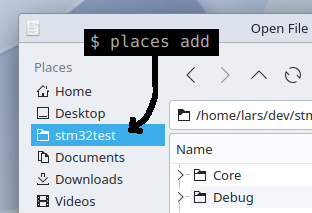
Places, find it on github, is a command line utility for managing folder bookmarks and “places” in Linux desktop environments. The script updates Places in KDE and Bookmarks in GTK environments, making it effective for almost all applications.
Introduction
I wanted to mention a neat script I featured in the first video on the new Lars’ Electric Endeavors YouTube channel.
When projects get complicated and directory structures deep, you might find yourself spending an unreasonable amount of time navigating to folders in File Save and Load dialogs and in file managers. The Places script is intended to improve on the situation by making it easy to add and remove shortcuts to frequently used folders.
With the places script, you can simply type places add <PATH> in a terminal, and the path will be added to KDE's Places, GTK-2 and GTK-3 bookmarks in one go, making the folder shortcut available in almost all Linux applications.
Installation
Follow the instructions on github.
Usage
As printed by the script:
Places v1.1 by Lars Ole Pontoppidan.

CLI tool for managing folder bookmarks and places in Linux desktop environments.

https://github.com/larspontoppidan/places-cli

Usage:
  places list                    List all bookmarks
  places add <TITLE> <PATH>      Add bookmark at PATH with the given TITLE
  places add <PATH>              Add bookmark at PATH using the PATH folder name as title
  places add <FILE>              Add bookmark at the folder of FILE using FILE name as title
  places remove <TITLE>|<PATH>   Remove bookmark referring to TITLE or PATH

Enabled environments:
  KDE user places
  GTK-3.0 bookmarks
  GTK-4.0 bookmarks
Examples
Let's use a classic example for me. When building Linux images with the Yocto Project, the produced images are placed in a deeply nested folder. I have spent an embarrassing amount of time hunting down this folder during the years.
To make a shortcut to the folder, I would navigate to the folder in a terminal, or with a File Manager clicking "Open Terminal Here" and type places add .
~/build/yocto/tmp/deploy/images$ places add .
Added: 'images' at: '/home/lars/build/yocto/tmp/deploy/images' to KDE user places
Added: 'images' at: '/home/lars/build/yocto/tmp/deploy/images' to GTK-3.0 bookmarks
Added: 'images' at: '/home/lars/build/yocto/tmp/deploy/images' to GTK-4.0 bookmarks
and the bookmarks are made. Notice how the script picked the name of the top folder as the bookmark title.
Let's say we didn't want that title. Here's how to remove the bookmark:
~/build/yocto/tmp/deploy/images$ places remove .
Removed: 'images' at: '/home/lars/build/yocto/tmp/deploy/images' from KDE user places
Removed: 'images' at: '/home/lars/build/yocto/tmp/deploy/images' from GTK-3.0 bookmarks
Removed: 'images' at: '/home/lars/build/yocto/tmp/deploy/images' from GTK-4.0 bookmarks
The remove command figured out we were referring to a path. We could also have referred to the title with: places remove images
Now, by specifying the title manually we get the bookmarks named as intended:
~/build/yocto/tmp/deploy/images$ places add "Yocto images" .
Added: 'Yocto images' at: '/home/lars/build/yocto/tmp/deploy/images' to KDE user places
Added: 'Yocto images' at: '/home/lars/build/yocto/tmp/deploy/images' to GTK-3.0 bookmarks
Added: 'Yocto images' at: '/home/lars/build/yocto/tmp/deploy/images' to GTK-4.0 bookmarks
To see all current bookmarks places list can be used:
$ places list
KDE user places: (/home/lars/.local/share/user-places.xbel)
  Home                 /home/lars
  Desktop              /home/lars/Desktop
  Downloads            /home/lars/Downloads
  Videos               /home/lars/Videos
  Pictures             /home/lars/Pictures
  Lars                 /home/lars/Lars
  Yocto images         /home/lars/build/yocto/tmp/deploy/images

GTK-3.0 bookmarks: (/home/lars/.config/gtk-3.0/bookmarks)
  Lars                 /home/lars/Lars
  Yocto images         /home/lars/build/yocto/tmp/deploy/images

GTK-4.0 bookmarks: (/home/lars/.config/gtk-4.0/bookmarks)
  Lars                 /home/lars/Lars
  Yocto images         /home/lars/build/yocto/tmp/deploy/images
I hope you enjoyed this content!

Comments powered by Talkyard