
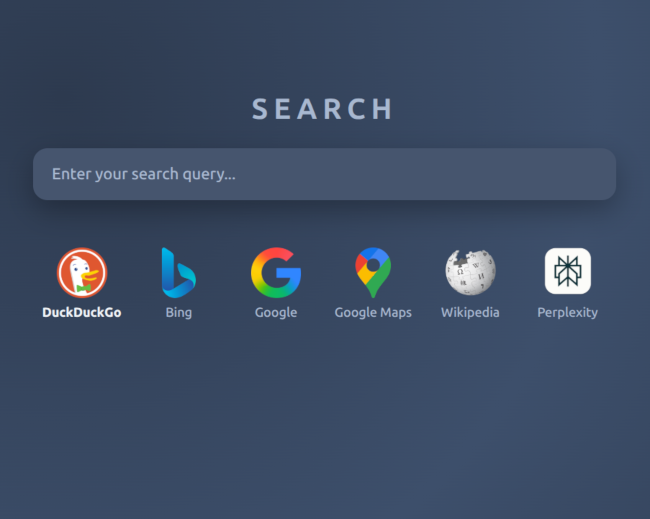
Just Search Portal v2
Just Search Portal just got a complete rewrite using React, Typescript, and Vite. The new version is smoother and a lot more configurable. But the concept remains the same: a lightweight new tab page for sending search queries directly to search engines, without distractions and respecting privacy.
Introduction
I used the original Just Search Portal as my main browser new tab page religiously for more than 5 years. The ability to send a search query directly to a specific engine remained very relevant, and with the OpenSearch plugin integration, I could select some text, send it to the portal, make a few edits, and then toss it to some engine. It was very useful stuff.
But eventually, I grew tired of the old interface and missed modern search engines. The old version was quite annoying to maintain, so I never updated it with newer engines. Finally, after installing a new OS, I didn't set it up as my new tab page, and I fell into the bad habit of simply sending all my search queries to some random tech corporation.
Well, that changed now. There is a brand-new version ready, and it significantly improves on the old one. It's hosted at justsearchportal.com again, and still named "Just Search Portal". But it's v2 now.
New features
- Fully customizable search engines and links. The first version could only work with the included set of engines.
- A section for links without any searching
- High-resolution icons
- Dark and light themes (and an in-between theme)
- Middle-click opens in a new tab, left-click opens in the same tab
- The page is still contained in a single index.html file, but it's built with modern tooling such as React, Typescript, and Vite.
Lost features
Some features were left behind:
- The ability to set multiple default search engines that are all used at the same time when hitting enter. I don't think anyone ever used this feature, regardless of how clever it felt.
- The ability to show all engines or only show selected engines with a simple toggle
- Extreme lightweightness. v2 is only very lightweight.
Experiences using Cursor
I developed Just Search Portal v2 in Cursor using agents and AI tab complete along with manual code edits. Going into the project, I had basically no experience with React and modern website tooling, so having these code-generation tools was a real enabler. In the beginning, I asked the agent to create a best-practices website according to my specifications and to explain what it did, and it simply did amazing. Just using the agent this single time probably saved months.
After the great performance in generating boilerplate code, I felt the agent was great at about 75% of the tasks I gave it. Getting into the weeds of an increasingly complicated project, it often lost its cool and provided increasingly stupid solutions. It seemed unable to take a big-picture view of the code and refactor it to be more logical.
I think it’s critical to take ownership of the agent-generated code and refactor early to put it on the right track. Coding with an agent requires constant vigilance, or the agent will run the project off a cliff.
I felt the Opus v4.5 model was the smartest agent at the time of writing this. It did things surprisingly well. For visual aspects, I tended towards OpenAI models, as they seemed to understand visuals better and produced better looking HTML and CSS.
The code, as it is now in v2.0, is about 50% agent-created and 50% manually edited or written. I have decided to make the project fully open source again and release the code under the MIT license.
Find the source at Github here.
I hope you enjoyed this content!

Comments powered by Talkyard